RAM
- 4.7
- Rating
- 500.00K
- Installs
- Free
- Price

 Analysis by App-foxy
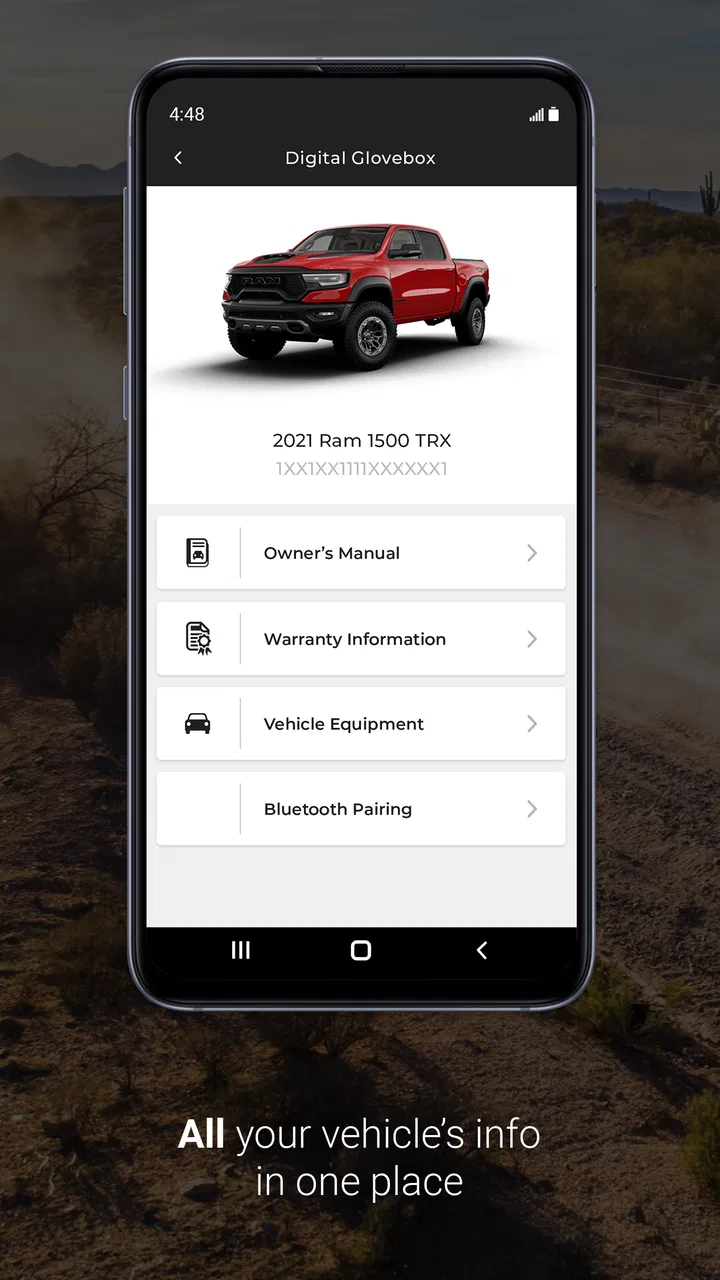
I approached RAM as the kind of companion app that needs to justify its place on a phone after the first few curious taps. It is a free lifestyle app from FCA US LLC, built for RAM owners rather than for general vehicle shopping or broad automotive news. That focus is its main appeal: instead of trying to be an all-purpose driving tool, it aims to keep ownership-related information closer at hand.
My first impression was practical rather than flashy. The app makes the most sense when I think of it as a digital ownership companion: something to check when I am dealing with a truck, planning a trip, trying to remember an ownership detail, or looking for a more direct route to RAM-related information. It is not the sort of app I would open for entertainment, and that is important when deciding whether it deserves permanent space on your home screen.
What the first week feels like
During the first week, the appeal comes from convenience. Vehicle ownership often involves small questions at inconvenient moments. I may need to check something before leaving home, prepare for a service visit, or look up information while standing beside the truck. A dedicated RAM app feels more focused than searching the web and sorting through unrelated pages.
You May Also Like

 Blood Strike: 2.5 Anniversary
Blood Strike’s Loadouts Turn Every Drop Into a Tactical Gamble
A close look at Blood Strike’s custom loadouts: how fast access to signature weapons reshapes its battle royale rhythm, rewards preparation, and narrows the gap between fights.

 Pandora - Music & Podcasts
Pandora’s Music Is Easy to Start, but Harder to Recover
Pandora’s strength is its low-effort path from a seed to a station. Its weak spot is how much confidence it asks you to place in connection, setup, and quiet recovery.

 8 Ball Pool
 Is Built on Rivalries, Rematches, and Routine
A close look at the rivalries, rematches, shared routines, and unanswered safety questions that turn a quick pool match into a persistent mobile community.

 Samsung Music
’s Quiet Strength Is Playing What You Already Own
Its reach comes less from spectacle than from dependable access to a personal library. That simplicity is both the app’s strongest retention engine and its ceiling.

 AccuWeather: Weather Radar
AccuWeather Review: A Quick, Clear Forecast for Everyday Decisions
For everyday plans, the best forecast is the one you can understand quickly. AccuWeather makes rain timing, radar, and local conditions easy to act on, with a few trade-offs.

 Hill Climb Racing
Why Hill Climb Racing Still Turns Crashes Into One More Run
A tiny car, a bumpy hill and one more upgrade: Hill Climb Racing keeps resurfacing because its simple chaos makes every near-miss feel personal.
More From Our News Desk
View All News


That focus also makes the experience easier to understand for a new owner. The app’s identity is clear from the beginning: it is for people who own or closely manage a RAM vehicle. The Everyone age rating makes it broadly approachable, although the useful audience is naturally narrower than the rating suggests. A family member helping with the truck can use it, but a person with no connection to RAM has little reason to keep it installed.
I also like that the app is free. There is no purchase decision to make before trying it, so the sensible approach is to install it, explore the areas relevant to your ownership routine, and then decide whether it saves enough time to remain useful. That trial is especially worthwhile if you recently bought a RAM vehicle or are still learning where to find the information you need.
The app has reached more than half a million installs, with a 4.7 average from roughly seventeen thousand ratings and about two thousand nine hundred written reviews. Those figures suggest that the basic idea resonates with a substantial owner audience, but I would not treat popularity as proof that every RAM owner will use it regularly. A vehicle companion is valuable only when it fits the owner’s actual habits.
A realistic everyday use case
Imagine preparing for a weekend drive. I would rather spend a few minutes checking the app before loading the truck than search through several unrelated sources while trying to remember which information applies to my vehicle. If the app gives me the ownership material I need in one place, that small reduction in friction is the real benefit.
The same applies before a service appointment. Instead of relying entirely on memory, I can use the app as a reference point while gathering questions or checking details. It does not replace a conversation with a technician, and I would never use a phone app as a substitute for urgent mechanical advice. Its value is in preparation and access, not diagnosis.
One useful habit is to explore the app when you are calm, not when you are already late. I would spend the first session learning where the important sections are, then return only when a real ownership task gives me a reason. This avoids the common mistake of opening a vehicle app repeatedly without knowing what it is supposed to help with.
Where it differs from ordinary alternatives
The usual alternative is a web search, a browser bookmark, a paper folder, or a general note-taking app. Those options can be more flexible, especially if you own several vehicle brands or want to collect independent advice. A browser is also better when you need broad comparisons, repair discussions, or information from people outside the manufacturer’s ecosystem.
RAM’s advantage is narrower and more deliberate. The app is easier to justify when you prefer manufacturer-focused information over a scattered collection of pages. I would choose the app for quick ownership reference and use a browser for independent research. Treating it as a replacement for every automotive source would create disappointment because those tools serve different purposes.
That distinction is one of the most important things I noticed. A dedicated brand app can reduce searching, but it can also limit the viewpoint. If you want candid owner experiences, detailed third-party troubleshooting, or comparisons between brands, the open web and specialist communities remain stronger. RAM is most useful when the question is connected directly to owning a RAM vehicle.
Does it keep earning its place?
The first-week novelty is easy to understand. The harder test is what happens after the initial exploration. I do not expect to open a vehicle companion every day, and I would consider that normal rather than a weakness. Its long-term value comes from being available at the right moments, not from demanding constant attention.
Month to month, I would keep it installed if it repeatedly shortens small ownership tasks. A service visit, a trip, a change of vehicle, or a question from another driver can create a reason to return. The app does not need to become a daily habit to be worthwhile; it needs to be reliable enough that I remember it when a RAM-specific question appears.
This is a different kind of recurring value from a navigation or fuel app. Navigation earns daily space through frequent use. A RAM ownership app may be used less often but can still be useful because the situations it addresses are more specific. I would judge it by whether it prevents repeated searching and helps me feel more organized, not by how many times I launch it in a week.
Building a low-effort ownership routine
My preferred routine would be simple. I would open the app after installation, review the areas that relate to my truck, and make a mental note of where the most useful information lives. Then I would check it before a planned service visit or longer journey rather than scrolling through it without a purpose.
That approach also helps separate lasting value from novelty. If I find myself returning only because the app is new, the interest will probably fade. If it becomes part of a repeatable preparation routine, it has earned a place. The key is to connect it to events I already do, such as checking the vehicle before travel or preparing questions for maintenance.
Another practical tip is to use it alongside, not instead of, your existing records. I would still keep receipts, service paperwork, and important vehicle details in a dependable place. An app can make access easier, but ownership records should not depend on one screen or one application. This is especially sensible for drivers who keep multiple vehicles or share responsibility with another person.
Who benefits most
The strongest audience is a current RAM owner who wants a brand-specific reference point and prefers a dedicated app to repeated browser searches. It is also a sensible trial for a recent buyer who is still becoming familiar with the ownership process. Someone who helps manage a family member’s truck may find it useful as a shared reference, provided everyone understands which information applies to which vehicle.
I would be less enthusiastic for a person who changes vehicles frequently, owns several brands, or already has a carefully organized system that works well. In that situation, a general notes app, browser bookmarks, or a broader automotive service may be more convenient. The same is true for someone looking mainly for independent repair advice or community discussion rather than manufacturer-focused ownership support.
That does not make RAM a poor choice; it simply gives the app a clear boundary. Its usefulness depends on being inside the RAM ownership ecosystem. If that connection is not part of your everyday life, the app is likely to feel unnecessary after the first exploration.
The maintenance burden
Any ownership app creates a small amount of digital maintenance. I have to keep it updated, remember that information may be organized around the vehicle rather than around my personal filing system, and occasionally revisit how I use it when my ownership situation changes. The current version is 1.99.701, and the app supports devices running iOS or Android 9 and later, so compatibility is worth checking before installation on an older phone.
The burden is not just technical. There is also the mental effort of deciding whether the app is still useful. If I never open it, it becomes another dormant icon. If I rely on it for essential details without keeping any backup, I may be making my ownership routine too dependent on a single tool. I prefer a middle ground: use it for convenience, but retain important documents and urgent contacts elsewhere.
Updates can be a mixed experience in any app. They may improve stability or organization, but they can also change where familiar information appears. My advice is to avoid waiting until the minute before a trip or appointment to discover whether the app still feels familiar. A quick occasional check is enough to keep the workflow comfortable without turning maintenance into a chore.
Where fatigue can appear
The main source of fatigue is infrequent use. When an app solves occasional problems, I may forget it exists and return to a browser out of habit. That is not necessarily a failure of the product; it is a challenge for every specialized utility. The app has to be easier to remember than the alternatives, and I have to give it a fair chance to become part of my preparation routine.
Another possible friction point is narrow relevance. A RAM-focused tool is helpful when the question concerns RAM ownership, but it is not the best place for every driving need. I would not expect it to replace navigation, a general maintenance tracker, independent automotive research, or emergency assistance. Keeping those expectations realistic prevents the app from feeling incomplete simply because it was designed for a specific job.
I also think about shared ownership. If more than one person drives the truck, the app may be convenient as a reference, but each person still needs to understand the vehicle and its maintenance responsibilities. A digital companion can support communication; it cannot automatically create a complete shared record or replace careful handover between drivers.
Privacy and attention are worth considering in a broader sense too. I would install only the official app, review what it asks me to do during setup, and avoid using a phone while driving. The safest workflow is to prepare before departure or stop somewhere appropriate. Convenience loses its value if it encourages distracted interaction behind the wheel.
How I would use it over a year
Over a longer period, I would measure the app by several practical moments rather than by launch frequency. Did it help me prepare for service? Did it make a vehicle-related question quicker to answer? Did I remember it when I needed RAM-specific information? If the answer is yes a few times, that may be enough to justify keeping it free on the phone.
I would also reassess after the ownership routine changes. A new truck, a change in drivers, or a different approach to maintenance can alter the app’s usefulness. What feels essential during the first months of ownership may become less important later, while a previously ignored feature may become relevant when circumstances change. That flexibility is a reason to keep the app available, but not a reason to force it into daily use.
The strongest long-term strategy is to pair it with a clear personal system. I would use RAM for convenient brand-specific access, keep important documents in a separate record, and use independent sources when I need opinions or technical depth. This three-part approach avoids asking one app to do everything and makes each tool easier to judge on its actual strengths.
My long-term verdict
RAM earns lasting space when it reduces ownership friction, not when it tries to become a daily destination. I see it as a focused utility for current RAM owners who want a direct, manufacturer-centered companion on their phone. The free price makes trying it easy, and its strong average rating and sizable user base indicate that many owners find the concept worthwhile.
My recommendation is strongest for recent owners, drivers who regularly prepare for service or travel, and anyone tired of searching through general web results for RAM-related information. I would skip it if I had no RAM connection, preferred independent automotive communities, or already had a better cross-brand system that I genuinely use.
After the novelty fades, the app’s value becomes quieter. It will not necessarily be opened every day, and that is not the standard I would use. If it becomes the first place I check for a RAM ownership question, it has done its job. If I keep forgetting it and return to the browser every time, uninstalling it would be reasonable. In my view, RAM is worth trying because its focused purpose can save time, but its permanent place on your phone should be earned through repeated practical use.
FAQs for RAM
01What is RAM and how does it work on my device?
RAM (Random Access Memory) is a type of computer memory that stores data temporarily. It allows apps and games to run efficiently by providing the necessary space for them to operate. The more RAM your device has, the better it can handle multiple tasks simultaneously, enhancing overall performance.
02How much RAM do I need for my smartphone or tablet?
The amount of RAM you need depends on your usage. For basic tasks like browsing and social media, 2GB to 4GB is usually sufficient. However, for gaming, multitasking, or using heavy apps, 6GB to 8GB or more is recommended to ensure smooth operation without lag.
03Does RAM affect gaming performance on my device?
Yes, RAM significantly impacts gaming performance. Games require a lot of memory to load graphics and run smoothly. More RAM allows for better multitasking and faster loading times, reducing lag and enhancing the overall gaming experience on your device.
04Can I upgrade the RAM on my smartphone or tablet?
Most smartphones and tablets do not allow RAM upgrades as the memory is soldered onto the motherboard. However, you can optimize performance by closing unused apps, clearing cache, and ensuring the device's operating system is updated to manage the available RAM efficiently.
05How can I check the RAM usage on my device?
To check RAM usage, go to the settings menu on your device. Under 'Device Maintenance' or 'Memory', you'll find details about how much RAM is used and available. This information helps identify apps consuming excessive memory, allowing you to manage resources better and improve performance.
Pros
- User-friendly interface enhances navigation.
- Offers real-time memory usage insights.
- Customizable notifications for memory alerts.
- Supports various languages for global users.
- Minimal impact on device performance.
Cons
- Contains ads that may disrupt user experience.
- Limited features in the free version.
- Requires internet for some functionalities.
- May not work on older device models.
- Occasional lag in memory optimization.

RAM
Gallery